Communication between agents is an essential part of SCOP Framework. It is important because it allows the agents to interact with each other and share information. This helps the agents to make better decisions and also helps to form more realistic simulations of complex systems. Communication between agents also allows for emergent behavior to develop, which can be used to create more realistic simulations of the real world. By allowing agents to interact with each other, the simulated environment can become more dynamic and responsive to changes in the environment or the agents, allowing for more realistic simulations of complex systems.
For effective communication, SCOP Framework uses a well defined addressing scheme.
Based on this scheme, SCOP Framework currently supports two types of communication:
(1) through a multi-threaded scheme using shared message queues, and
(2) using one of the most widely used communication protocols in the IoT and Cloud Community called MQTT.
1 - Identifiers
A guide to agent identifiers in SCOP Framework.
Overview
All agents have dedicated identifiers identifying them within environments with respect to each role they are playing in each environment.
The agent identifier structure is represented by the Identifier class. This class simply stores the name of the agent, the role it is playing and the environment where it plays the role.
Identifier implements the Serializable interface because it can be put inside Message objects that are communicated through a network.
Understanding identifiers
When an agent takes a role, a corresponding unique Identifier is assigned.
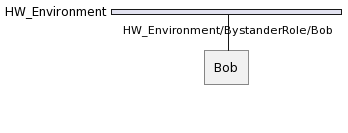
For example, when an agent called Bob takes Bystander from HW_Environment at tick 0 as follows:
...varagent=newAgent("Bob"){@Overrideprotectedvoidsetup(){// create the bystander role for playing inside hwEnvironment
newBystander(this,hwEnvironment);...}};...
SCOP Framework will assign this role the following Identifier:
HW_Environment/Bystander/Bob
Hereafter, the other agents can communicate with the Bystander of the Bob agent using this address through HW_Environment.
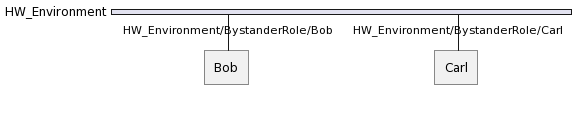
If another agent called Carl plays the same role in HW_Environment, we will have following situation:
Getting an Identifier
Agent identifiers are uniquely assigned for each role. To get the identifier of a specific role, all you need to is to call the getIdentifier() method inside one of the actions of that role.
However, this should be done with great care, as a single mistake will unable the communication.
Having multiple identifiers
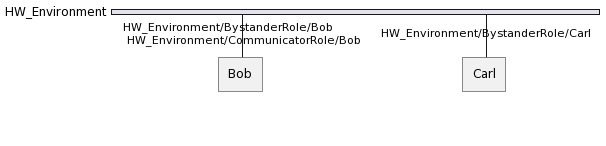
An agent can play multiple roles in the same environment and thus can have multiple agent identifiers dedicated to each role it plays in that environment.
For example, supposing that Bob plays also Communicator in HW_Environment yields the following:
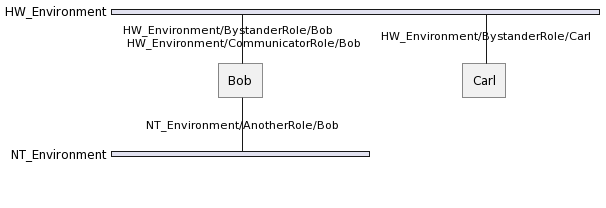
An agent can also play multiple roles in different environments and thus can have multiple agent identifiers dedicated to each role it plays in the dedicated environment.
Hence, supposing that Bob plays AnotherRole in NT_Environment yields the following situation:
2 - Messaging
A guide to agent messaging in SCOP Framework.
Overview
Communication between agents is established by exchanging Message objects.
An Message is a discrete unit of communication intended by the source for consumption by some receiver(s) or group of receivers.
It is ignorant to the agents and artifacts and deals only with their addresses.
Preparing a Message
When an agent wants to communicate with other agents, it has prepare an Message object as below by specifying the at least one receiver’s Identifier in the Message object.
For example, an agent can prepare a TYPE message for sending a String Hi there! payload to another agent called Carl as below:
Here it should be noted that this aMessage is targeting Bystander of Carl. and it will be handled directly with that role.
If Carl leaves the corresponding role (i.e. the role is inactive), then his Identifier becomes inactive and message no longer reaches Bystander of Carl.
That is to say, an agent message sent to a dedicated Identifier will not be delivered to the corresponding receiver role if the receiver agent has left the related role.
Sending a Message
To enable seamless communication between different agents, the SCOP Framework provides a simple and effective way to send messages using the sendMessage method, as illustrated by the following code snippet:
as(Communicator.class).sendMessage(message);
The as(Communicator.class) portion of the code is used to access the communication capabilities of an agent within the same environment of the role that call it. This syntax allows the agent to assume the role of a “Communicator” to send messages.
The sendMessage(Message) method is a built-in function provided by the SCOP Framework’s Communicator role. It serves as the primary mechanism for transmitting messages from one agent to another.
Receiving a Message
To receive a specific type of message, the dedicated role must implement a handler method whose signature as public void handleTYPEmessage(Message message) where TYPE is the type of the message. For instance, the aforementioned PING message can be handles as below:
publicclassBystanderextendsRole{...publicvoidhandlePINGMessage(Messagemessage){// code to handle the message
}}
The rest is managed by the SCOP Framework and the sent message is delivered to the dedicated handle methods. As a developer, you do not need to do anything else.
Note that, if the handler message is not implemented, the send messages will be lost.